
Bold Create is Syncfusion’s cloud coding agent. You describe a task in plain language, and the agent works on your repository in a cloud environment. It reads your code, edits files, runs commands, and opens a pull request when you ask for one. Bold Create runs in your browser. You do not need to install anything or keep your computer on while the agent works. Each task lives in a thread, so you can follow progress, review the changes, and send follow-up instructions.
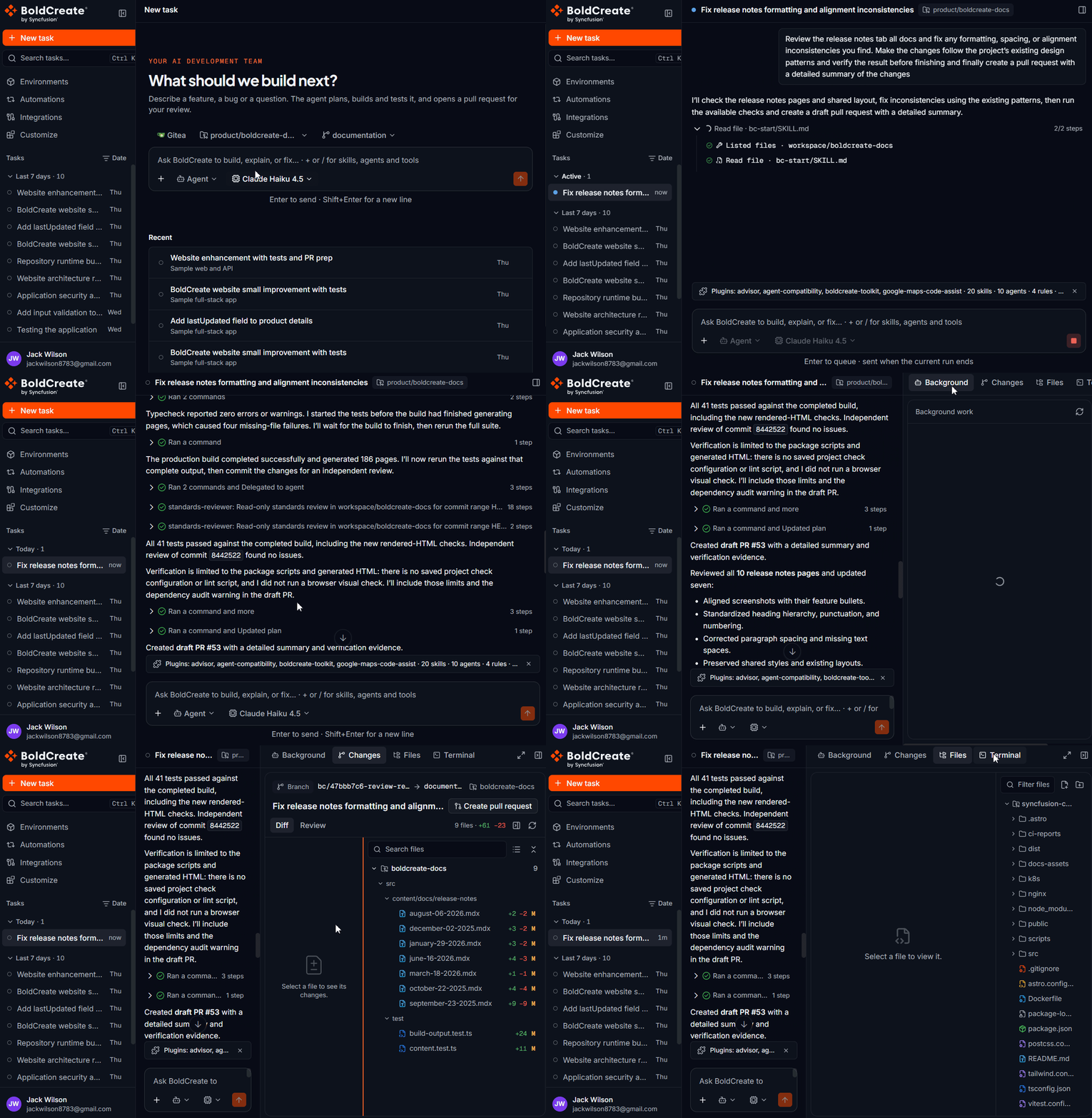
What can you do with Bold Create
- Automate development work: Hand off repetitive tasks such as bug fixes, test writing, and code reviews, and review the result as a pull request.
- Run tasks in parallel: Start a new task while others are still running. Each task runs in its own cloud environment, so you do not wait for one task to finish before you start the next.
- Let tasks run unattended: Tasks run in the cloud, not on your computer. Close the browser and come back later to check progress and results.
- Take on longer, complex work: Give the agent multi-step tasks that span many files. It writes code, runs commands, and iterates on the solution without blocking your machine.
- Work from anywhere: Everything runs in your browser. You do not need to set up a local development environment.
- Scale across repositories: Work on repositories from GitHub, GitLab, or Gitea, and reuse your team’s skills and agent settings in every task.
Key features
- Built-in agents: Choose Agent to make changes, Ask to get answers, or Plan to get a plan. Ask and Plan never change your code. Learn more on the Agent, Ask and Plan pages.
- Threads: Every task is a thread in the sidebar. Search, group, and return to any thread to continue the work. Learn more on the Threads page.
- Repositories and branches: Work on repositories from GitHub, GitLab, or a self-hosted Gitea server. Pick the branch the agent starts from. Learn more on the Integrations page.
- Models: Choose the model for each task, and set the thinking effort when the model supports it. Learn more on the Models page.
- Review changes: Open the Git panel to see changed files, line counts, and a diff for each file. Add review comments that go straight back to the agent. Learn more on the Review changes page.
- Pull requests: The agent works on its own branch. When you ask, it writes the pull request title and description and opens the pull request for you. Learn more on the Pull requests page.
- Environments: Save repositories, setup commands, start commands, and environment variables as a reusable environment for your team. Learn more on the Environments page.
- Skills: Package your team’s instructions, such as review checklists or coding standards, and add them to any message with /. Learn more on the Skills page.
- Dashboard: Settings, credits, and usage are managed in the BoldCreate Dashboard, which you open from the profile menu.
How it works
- Connect a Git provider. Connect GitHub, GitLab, or Gitea on the Integrations page.
- Pick where to work. Select a repository and branch, or a saved environment.
- Describe the task. Choose an agent and a model, then type what you want done.
- The agent works in the cloud. It sets up a cloud environment with your code, then reads, edits, and runs commands. You see each step in real time.
- Review the changes. Open the Git panel to inspect the diff and send review comments via chat to reiterate.
- Open a pull request. Ask the agent to open a pull request, then review and merge it in your Git provider.