
Problem summary
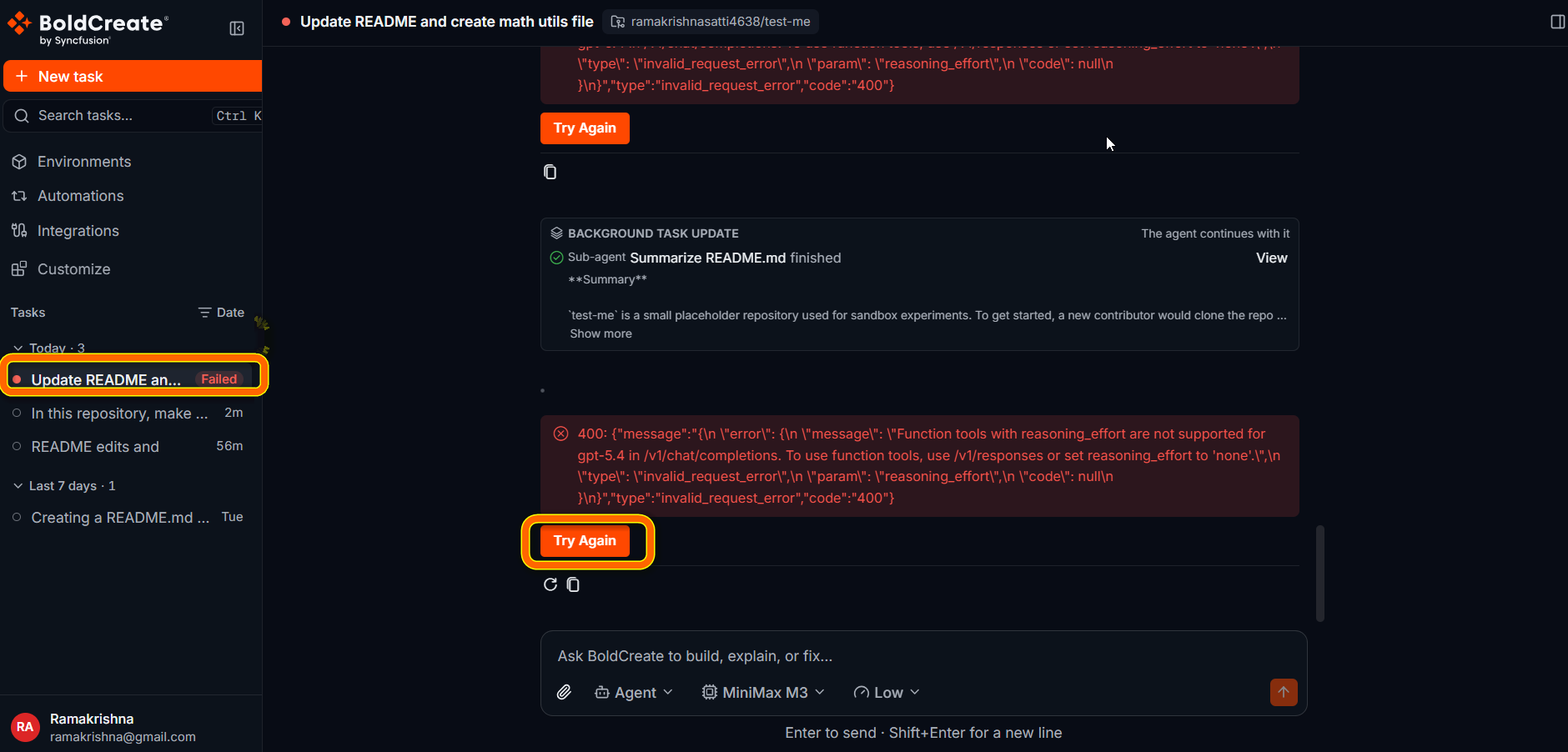
A run is one turn of the agent’s work in a thread. When a run can’t finish, it stops and the thread shows the Error status in the sidebar. Changes the agent already made stay on its working branch. You may see:
- A red warning triangle (Error) next to the thread under Tasks.
- A red error message in the thread, below the agent’s last response.
- Conversation unavailable when you open the thread.
- Unable to load chats in the sidebar.
Possible causes
- Your organization has too many runs at once.
- Your Git provider connection stopped working, or the provider is limiting requests.
- The selected model or a service was unavailable for a moment.
- An attachment could not be used.
- You stopped the run with Stop response.
Resolution steps
Step 1: Read the error message
- Open the thread from Tasks in the sidebar.
- Scroll to the end of the thread and read the red error message.
- Find the message in Common messages and follow its fix.
Step 2: Continue the run
Choose one of these, depending on what you want:
| Option | Where | What it does |
|---|---|---|
| Try Again | Below the error message, when the error can be retried | Starts a new attempt of the failed run with the model that is selected now. If the agent made progress, it continues where it stopped. |
| Retry | On the last response, on hover | Sends your last message to the agent again and starts a new run. |
| Follow-up message | Prompt box | Starts a new run with new instructions. The agent keeps the thread’s context. |
If the run failed because of the model, select a different model below the prompt box before you select Try Again.
If Try Again itself fails, a message starting with Try again failed: explains why. Wait a moment, then select Retry or send a follow-up message.
Common messages
| Message | Cause | Fix |
|---|---|---|
| {Provider} OAuth token is invalid or has been revoked. Please reconnect the integration. | Your Git provider connection stopped working. | Reconnect the provider. See Integration token expired or revoked. |
| {Provider} is temporarily unable to process your request due to rate limiting. Please try again in a few moments. | Your Git provider is limiting requests. | Wait a few minutes, then select Try Again or Retry. |
| {Provider} denied access to this resource. Check that your token has the required scopes and that you have access to the organization or repository. | Your account can’t access the repository. | Check your access in the Git provider. See Repository or branch not listed. |
| Unable to reach the {Provider} API. The provider may be temporarily unavailable or the host is unreachable. Please try again. | Bold Create could not reach your Git provider. | Check the provider’s status, then try again. |
| A message about attachments | An attached file is too large, of an unsupported type, or could not be uploaded. | Remove the file and send again. See Attachment not accepted. |
You stopped the run
When you select Stop response, the agent stops right away. Bold Create doesn’t show an error message in the thread, and the agent’s changes so far stay on its working branch. To continue, send a follow-up message, for example:
Continue where you stopped. Finish the remaining items in your todo list.The thread or thread list does not load
- Conversation unavailable: Bold Create could not open the thread. Select Try again. If it still fails, refresh the page. The message below the heading explains the reason.
- Unable to load chats: Bold Create could not load your thread list. Select Try again.
- More chats could not be loaded: older threads failed to load while you scrolled. Refresh the page.
- Something went wrong. Please refresh the page.: the page hit an unexpected problem. Refresh your browser. Your threads and runs are not lost. If these messages keep appearing, check your network connection and sign in again. See Sign in and access.
The run stays Running for a long time
Large tasks can take a while. Open the thread to check the live progress, steps, and todo list.
- If the agent is still making progress, wait.
- If nothing changes for a long time, select Stop response, then send a follow-up with a smaller, clearer task.
Best practices
- Keep tasks focused. Smaller tasks finish faster and fail less often.
- Review the Git panel after an error. The agent may already have done most of the work.
- Use Try Again first when it is offered. It keeps the agent’s progress.