
A skill is a set of instructions, and optional reference files, that teaches the agent how your team does a task. When a skill lives in your repository, everyone who works on that repository gets the same results when they ask the agent to do that task.
In this tutorial, you create a team-code-review skill. It tells the agent how to review code and which checklist to follow. You share it with your team through your repository, use it in a task to review a branch, and update it when your process changes.
Prerequisites
Before you start, make sure that:
- You completed the Quick Start.
- You have a repository connected through GitHub, GitLab, or Gitea, for example
your-org/sample-app, and you can push to it. - The repository has a branch to review, for example
feature/checkout-coupons.
What you’ll learn
By the end of this tutorial, you’ll know how to:
- See the skills you already have on the Customize page.
- Write a skill as a
SKILL.mdfile with a reference file. - Share a skill with your team through your repository.
- Use a skill in a task from the + menu.
- Update a skill when your process changes.
Step 1: Check the skills you already have
Plugins can already bring review skills. For example, the BoldCreate Toolkit plugin includes /code-review.
- In the sidebar, select Customize.
- Select the Skills tab. Every skill from your installed plugins is listed under its plugin, with a link to its source.
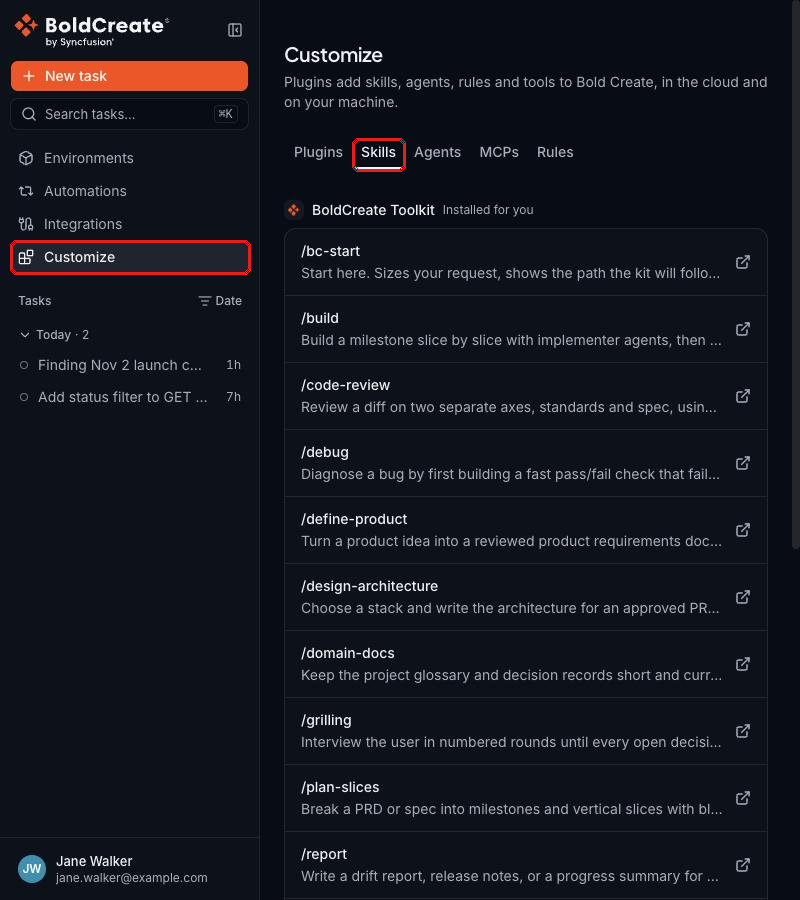
If an existing skill does what your team needs, use it. Create your own skill when the review must follow your team’s checklist and report format.
Step 2: Create the skill folder
Skills in a repository live in a skills folder at its root. This tutorial uses .boldcreate/skills/. For the other supported folders, see Skills overview.
Create this structure in your repository:
.boldcreate/skills/team-code-review/
  SKILL.md
  references/checklist.md
The folder name is the skill name. Use lowercase letters, digits, and hyphens.
Step 3: Write the instructions in SKILL.md
Add front matter with the name and description, then the steps the agent must follow:
---
name: team-code-review
description: Reviews code changes against the team checklist and reports issues by severity. Use when asked to review a branch, a diff, or a pull request.
---

# Team code review

## How to review

1. Find the changes to review. Compare the branch the user names with
   its base branch, for example `main`.
2. Read every changed file in full, not only the changed lines.
3. Check each change against `references/checklist.md`.
4. Do not change any files. Report findings only.

## How to report

Group findings by severity: **Blocker**, **Should fix**, **Nice to have**.
For each finding, give the file, the line, the problem, and a suggested fix.
End with a one-line summary and say whether the change is ready to merge.
The agent reads the description to decide when a skill applies. Say both what the skill does and when to use it.
Step 4: Add the checklist as a reference file
Reference files hold details the agent reads only when it needs them, such as checklists, templates, or examples. They keep SKILL.md short.
In references/checklist.md, add your checklist:
# Review checklist

- Tests cover the new or changed behavior.
- No secrets, tokens, or passwords in code or config.
- User input is validated before use.
- Errors are handled and logged, not swallowed.
- Public functions and API changes are documented.
- No unused code, debug logs, or commented-out code.
- Names are clear and follow the existing style.
Tip: You can also ask the agent to create the skill for you. Start a task on the repository and say:
Create a skill called team-code-review in .boldcreate/skills that reviews changes against our checklist.Review the files in the Changes tab, then create a pull request.
Step 5: Share the skill with your team
- Commit the skill folder and open a pull request, so your team can review the skill like any other code.
- Merge the pull request into your default branch.
Everyone who can read the repository can now use the skill in tasks on any branch that contains it. There is nothing else to configure.
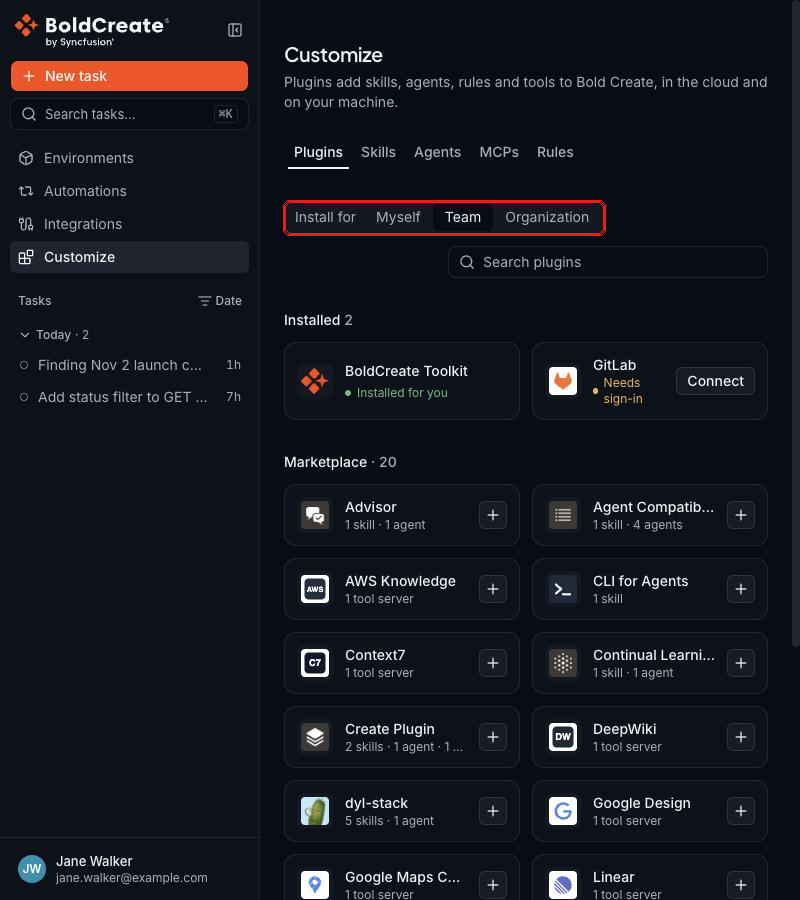
Note: To share a skill across many repositories, package it in a plugin. On the Customize page, select the Plugins tab, set Install for to Team or Organization, and install the plugin. Choosing Team or Organization needs a team lead or admin role. See Customize page and plugins.
Step 6: Use the skill in a task
-
In the sidebar, select New task.
-
Select Repository or environment, then select
your-org/sample-appand the branch to review, for examplefeature/checkout-coupons. -
Make sure the agent picker shows Agent.
-
In the prompt box, select + (or type
/), then select Skills. Search forteam-code-reviewand select it. The skill appears above the prompt box. -
Type your request and press Enter:
Use the team-code-review skill to review the changes on this branch.
Report findings only. Do not change any files.
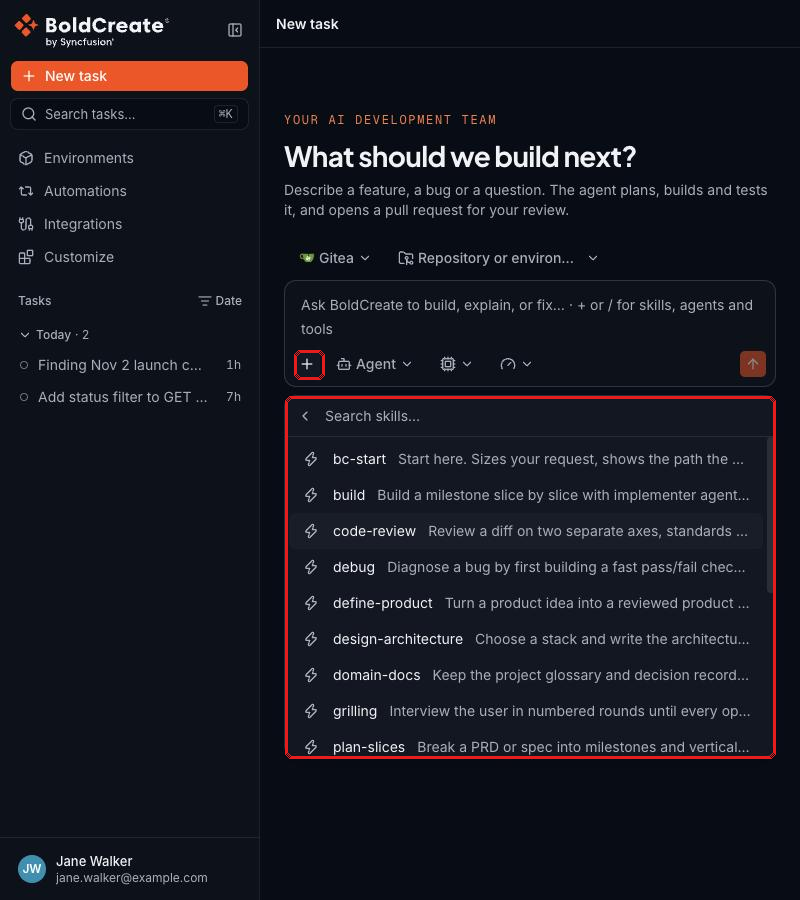
The agent can use every skill it can access. It picks a skill when the task matches the skill’s description. Naming the skill in your prompt makes sure the agent uses it.
Result
The agent reads SKILL.md, follows the steps, and checks the changes against references/checklist.md. It replies with findings grouped by Blocker, Should fix, and Nice to have, and a summary that says whether the change is ready to merge.
To fix the findings, reply in the same thread, for example:
Fix the Blocker and Should fix items, then run the tests.Step 7: Update the skill
When your team’s process changes, update the skill once and everyone gets the change in their next task.
-
Edit
SKILL.mdorreferences/checklist.mdon a branch. For example, add this checklist item:- Database migrations can be rolled back. -
Open a pull request and merge it.
Changes apply from the next run. A run that is already in progress keeps the version it started with.