
Review comments let you point to exact lines in the agent’s changes and say what to fix, like a code review in your Git provider. You collect comments across files, then send them to the agent as one message. Use this before you ask the agent to open a pull request, or to fix problems in an open one.
Before you begin
- Have a thread where the agent changed files. The Git panel shows No changes yet until it does.
- Wait for the run to finish. You can’t send a new message while the agent is working, so you can’t send a review until the run is done.
Steps
Step 1: Open the diff
- In the top-right corner of the thread, select Open workspace panel. The Git panel opens.
- If the thread has several repositories, pick one in the repository selector, or keep All Repositories.
- Select a file in the file list to open its diff.
Step 2: Add a comment on a line
- Hover over the line you want to comment on.
- Select Add review comment at the start of the line.
- Type what should change and why.
- Select Comment, or press Ctrl + Enter (Cmd + Enter on macOS). To cancel, select Cancel or press Esc. The comment appears under the line and in the review list at the bottom of the panel, for example 1 review comment.
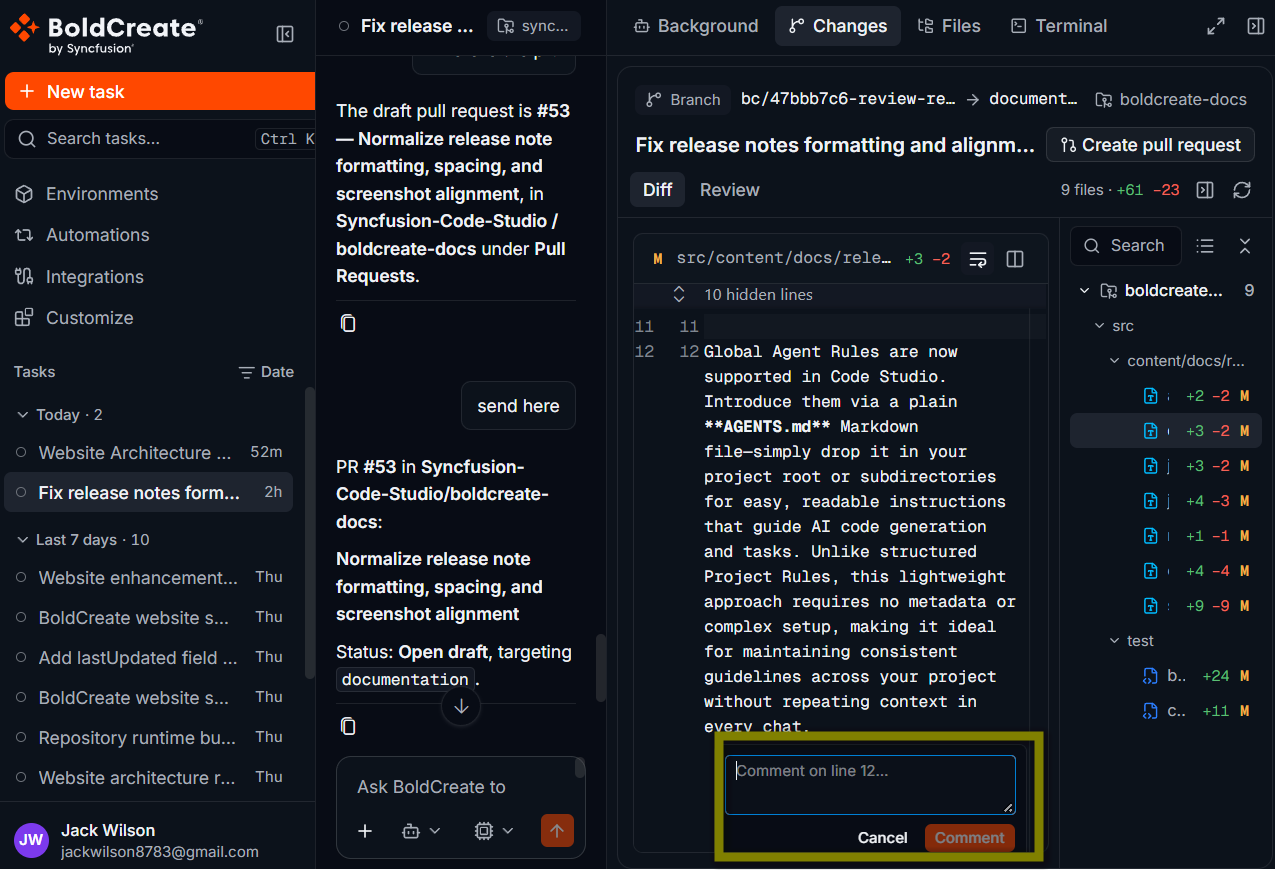
Step 3: Add the rest of your comments
Repeat step 2 for every line that needs a change, in any file. The file list shows how many comments each file has.
- To remove a comment, select the trash icon next to it in the review list.
- To change a comment, remove it and add it again.
- To remove all comments, select Clear.
Step 4: Send the review
- In the agent picker, make sure Agent is selected. Ask and Plan can’t change files.
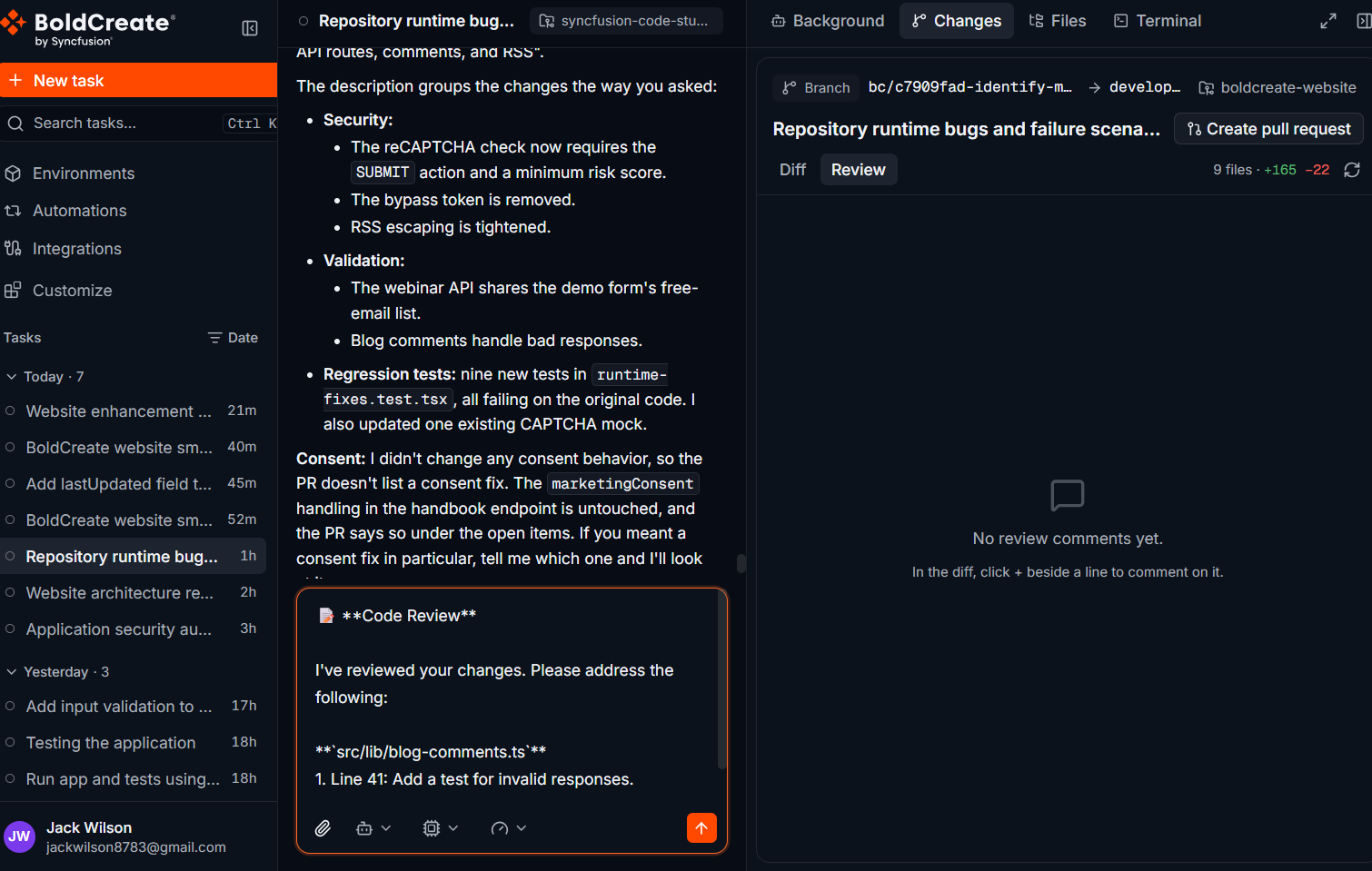
- In the review list, select Submit Review to Agent. Bold Create writes all your comments into the prompt box as one message, grouped by file and line, and clears the review list.
- Read the message. Add anything else you want, such as “Then update the pull request.”
- Press Enter to send it. The message looks like this:
📝 Code Review
I’ve reviewed your changes. Please address the following:
src/services/search.js
- Line 14: Use toLocaleLowerCase() so names with accents match too.
- Line 22: Trim the query before comparing.
Please fix these issues and commit the changes.
Submit Review to Agent doesn’t send the message by itself. Nothing is sent until you press Enter.
Verify
- Wait for the agent to finish.
- In the Git panel, open the files you commented on.
- Check that each comment was addressed in the diff. If something is still wrong, add new comments and send another review.
Write useful comments
| Instead of | Try |
|---|---|
| “Wrong.” | “This should return 404, not 500, when the product does not exist.” |
| “Fix naming.” | “Rename tmp to normalizedQuery to match the rest of the file.” |
| “Add test.” | “Add a test for an empty query string in tests/search.test.js.” |
- Say what and why: the agent fixes the cause better when it knows the reason.
- One issue per comment: split separate problems into separate comments.
- Batch your review: send all comments together instead of one message per comment.
Troubleshooting
- Add review comment does not appear: hover over a line inside the diff, not the file header. Make sure a file is selected.
- The comments disappeared: sending a review clears the review list. Your comments are in the message in the prompt box.
- The agent did not change any files: check that Agent was selected when you sent the review.
- The diff did not update after the fix: select the refresh button in the stats bar.