Cloud Tutorials Automations Set up Cloud Agent automations with schedules, code events, or webhooks, and use built-in recipes to run tasks automatically.
Overview
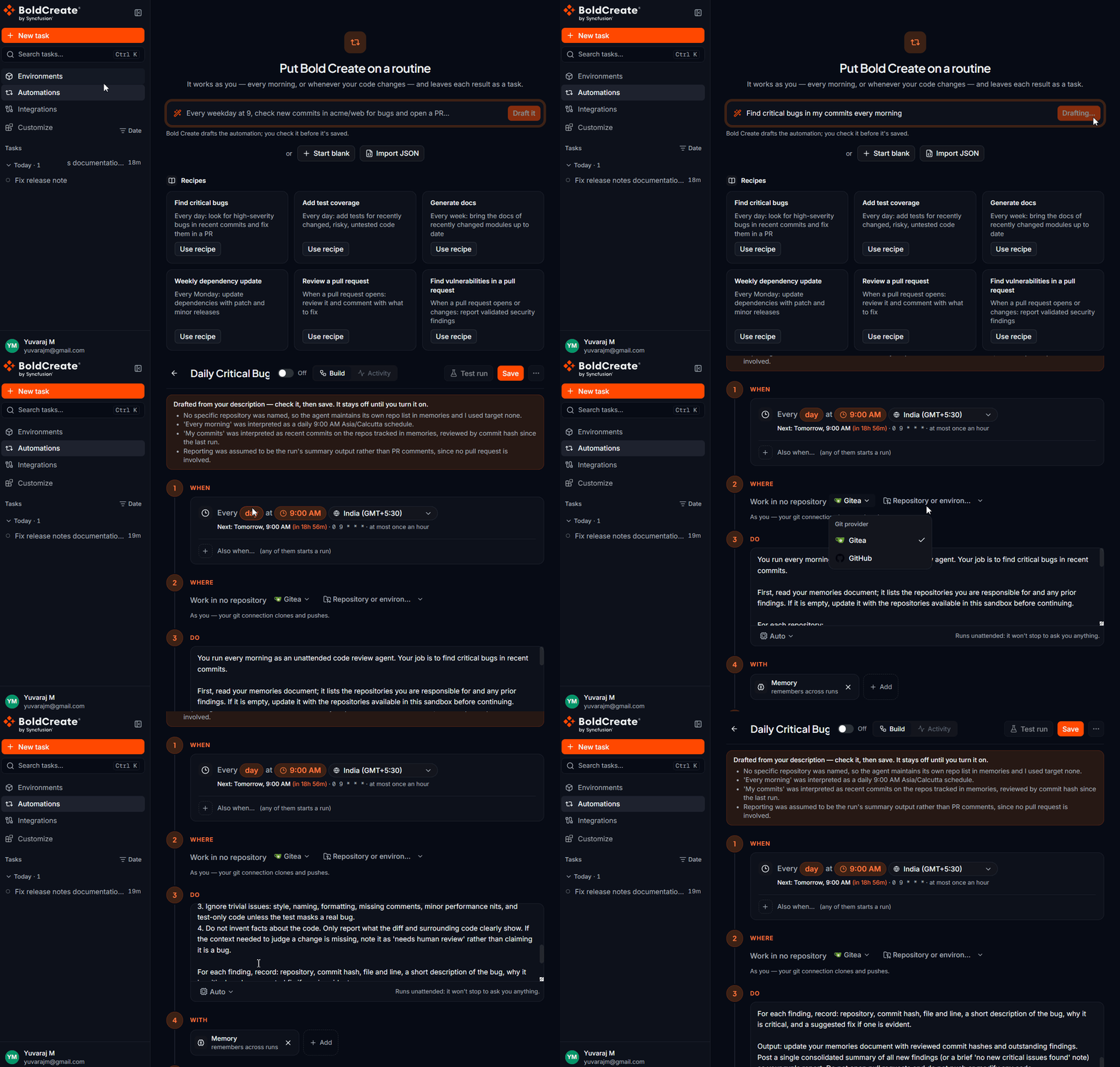
Automations are Cloud Agent tasks that start on their own, without manual initiation. You set when it runs, where it works, and what it may do. Each automated run becomes a task in your sidebar with a pull request, a review comment, or findings for your team to review and merge.
Core Value Proposition
Cloud Agent tasks triggered by schedules, code events, or webhooks
10 built-in recipes for common automation scenarios
Every run works in its own isolated sandbox
Changes arrive as pull requests for team review
Memory carries across runs (e.g., skips already-handled bugs)
All spending and audit controls apply
Key Capabilities
Feature Description Three Trigger Types Schedule (cron/weekday/daily/hourly), Code events (PR/comment/review/check), Webhook (CI/monitoring/tracker) 10 Built-in Recipes Pre-configured automations for common tasks (find bugs, add tests, generate docs, update deps, review PRs, fix CI, etc.) Guardrails Same sandbox, spending cap, and audit log as manual tasks; changes reviewed before merge Code Event Filters Run only on specific: base branch, head branch, author, title, labels, or draft status Memory Across Runs Automation remembers previously handled bugs, alerts, and tickets; skips duplicates Webhook Integration Accept POST requests with Bearer token auth; up to 10 runs/hour, deduplication within 10 minutes Test Runs Try one automation run before turning it on; review the task it produces NLP Setup Describe automation in one sentence; BoldCreate drafts the trigger, repo, and instructions for review
Setup & Configuration Steps
Creating an Automation
Option 1: Natural Language (Recommended)
Describe the automation in a sentence.
Example: “Find critical bugs in my commits every morning”.
BoldCreate drafts: trigger, trigger conditions, recipe/instructions.
Review and adjust.
Select repositories and environment.
Set run limits and filters.
Try a test run.
Turn on when ready.
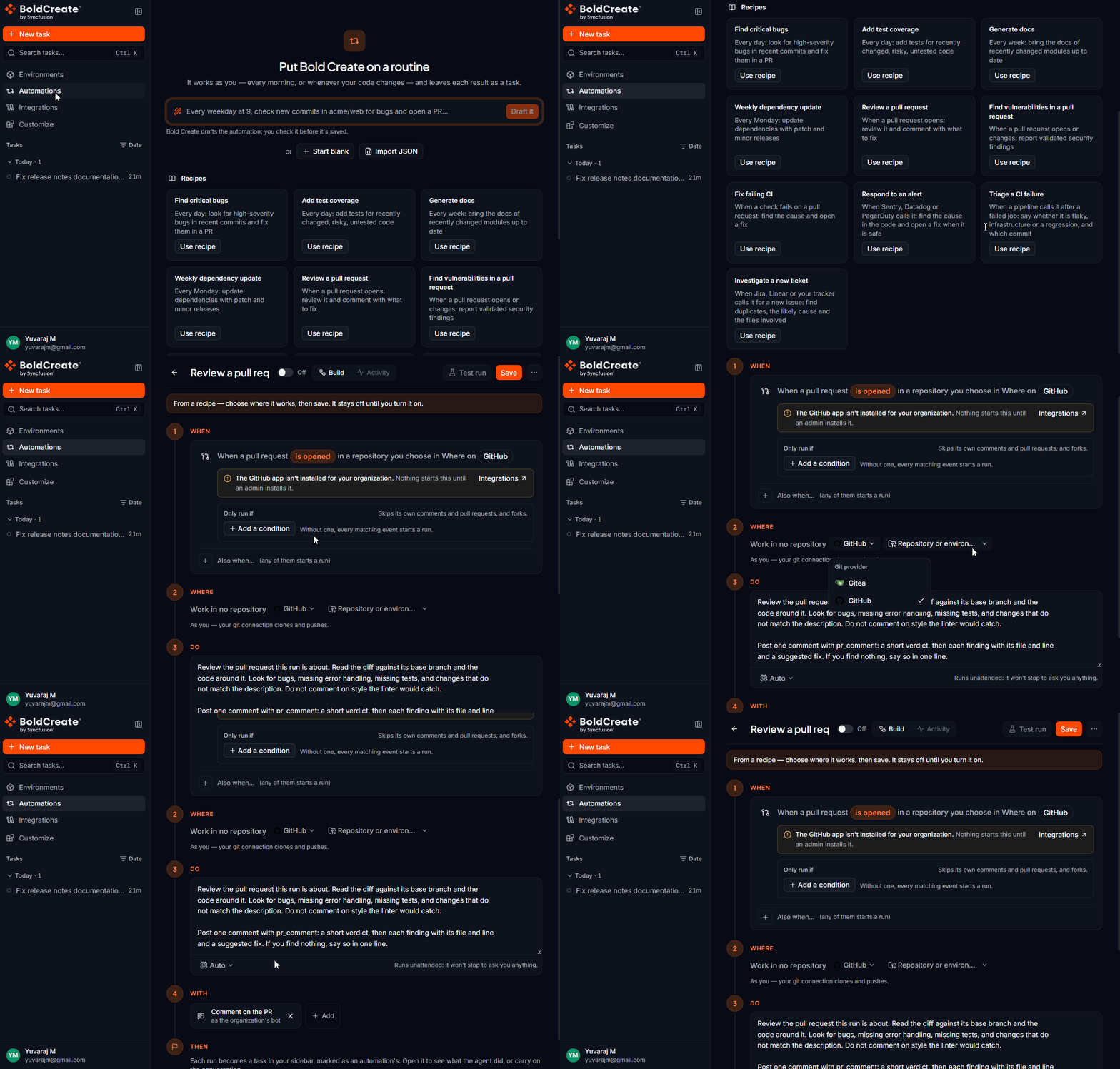
Option 2: Start from Recipe
Browse 10 built-in recipes.
Pick one (e.g., “Review a pull request”, “Find vulnerabilities”).
Customize trigger and conditions.
Select repositories.
Test and enable.
Option 3: Manual Configuration
Pick trigger type (schedule, code event, webhook).
Configure trigger-specific settings.
Write or select automation instructions.
Set what changes are allowed.
Add filtering conditions if needed.
Test and enable.
Trigger Types & Use Cases
Schedule Triggers
When to Use: Routine work that recurs at fixed intervals
Frequency Example Use Case Hourly Every hour Monitor logs, fetch alerts, triage failures Daily Every day at 9 a.m. Find critical bugs, update docs, refresh data Weekdays Monday–Friday at 9 a.m. Weekly test coverage, review old issues Weekly Every Monday 9 a.m. Dependency updates, security scans Custom Cron: 0 9 * * 1-5 Precise scheduling by hour, day, month, weekday
Built-in Recipes (10 Templates)
Each recipe comes pre-configured with trigger, instructions, and output type. Customize and save.
Daily Schedule Recipes
Recipe Trigger Does Output Find critical bugs Every day Scans last day’s commits for high-severity bugs; fixes each with a failing test first Pull request Add test coverage Every day Finds recently changed code without tests; writes focused tests in repo’s style Pull request Generate docs Every week Updates READMEs, doc comments, docs pages for modules changed in last week Pull request Weekly dependency update Every Monday Updates dependencies to latest patch/minor releases; builds and runs tests Pull request
Code Event Recipes
Recipe Trigger Does Output Review a pull request PR opened Reads diff and context; finds bugs, missing error handling, missing tests Review comment Find vulnerabilities PR opened/updated Validates security findings by tracing code paths; reports severity and fix Review comment Fix failing CI Check failed Reproduces failure; fixes with smallest change; runs check again Pull request
Webhook Recipes
Recipe Trigger Does Output Respond to an alert Sentry, Datadog, PagerDuty Finds code an alert points to; explains likely cause with fix Findings or pull request Triage a CI failure Pipeline webhook Decides if failure is flaky, infrastructure, or regression; names commit Verdict + evidence Investigate a new ticket Linear, Jira tracker Finds files involved; checks for duplicates; estimates change scope Findings or pull request
Quick Start Guide
Pick a recipe → E.g., “Review a pull request”
Or describe it → “Find bugs in new pull requests every day”
Set trigger → Schedule, code event, or webhook
Select repos → Where should this automation work?
Test run → Try once before enabling
Turn on → Automation now runs unattended
Core concepts Next Fix a bug and open a pull request